Activity Log
Provides a complete history of actions performed on your PumpKit account. It helps you track logins, wallet actions, exports, and other critical events for transparency and security.
Access
User Menu → Activity
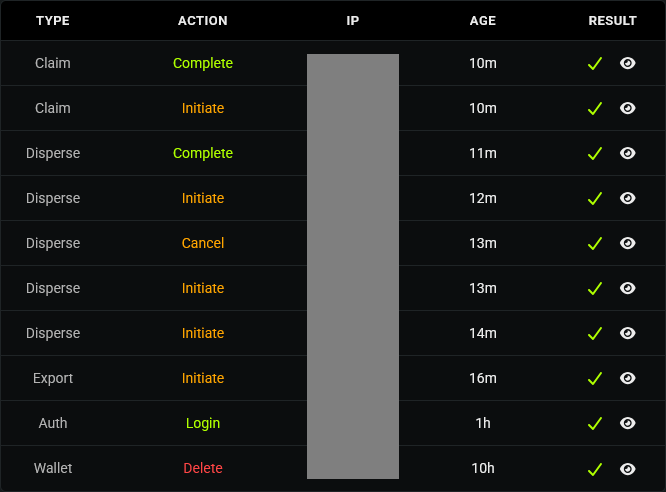
User Actions Table
Each log entry contains:
- Type - Category of action (e.g., Auth, Wallet, Export).
- Action - Specific activity performed (e.g., Login, Archive, Initiate, Complete).
- IP - The IP address where the action originated (if available).
- Age - Time elapsed since the action occurred.
- Result - Status of the action (✔ success / ✖ failure).
- Click the 👁 eye icon for more details if available.
Filters
- All Actions - Filter by type (Auth, Wallet, Export, etc.).
- All Results - Filter by result (Success, Fail).
- Reset - Clear filters and show all activity.

Pagination & Results
- Choose how many logs to display per page (10, 20, 30, 40, 50).
- Results counter shows your total recorded actions.
💡 Notes & Tips
- Review logs regularly to detect suspicious activity → check for unknown IP addresses or repeated failed login attempts.
- Export actions are always logged, showing both Initiate and Complete stages.
- Failed actions are recorded just like successful ones, ensuring a complete audit trail.
- Logs cannot be edited or deleted manually.