Live Trades
Live feed of recent transactions for the token you are monitoring. Pause the stream and read amount, MC, trader, and age per row.
Access
The live trades panel appears below the trade area when you are monitoring a token. It stays visible (it cannot be collapsed).
For top holders, Bubblemaps, and the YOU / Outsider summary, use the Wallets Panel (Holders and Bubblemaps).
Overview
The panel shows a live feed of recent transactions for the active token.
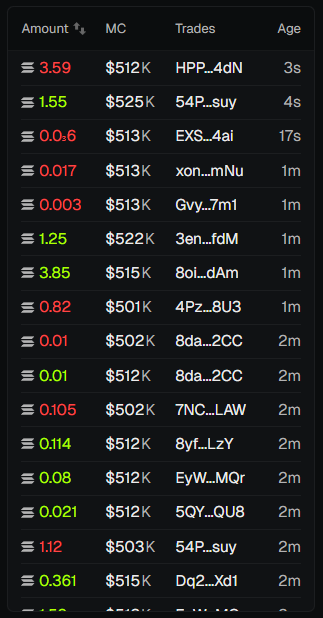
Columns
- Amount - SOL (for buys) or tokens (for sells). Click the header to toggle USD / SOL.
- MC - Market cap at time of trade.
- Trader - Wallet address (shortened). Your wallets are highlighted.
- Age - Time since the trade.
Pause - Click the pause icon to freeze the feed (useful when analyzing).
💡 Notes & Tips
- The feed updates in real time via WebSocket - stay connected for live data.
- Pair with the Wallets Panel for Holders and Bubblemaps.