Reclaim Rent
Get back the small SOL locked in empty token accounts after you sell out.
Access
User Menu → Reclaim Rent
Overview
On Solana, each token account holds a little rent (SOL) to stay open. When you sell all tokens from a wallet, that account can close and the rent can come back. Reclaim Rent pulls that SOL into your wallets.
Modes
Selected Wallets
- Only wallets currently selected in the Wallets Panel.
- Use after you’ve sold out of those wallets.
All Active Wallets
- All saved Dev and Trade wallets.
- Best for a full sweep.
Booster Holders
- After a Holders Boost (extra small wallets to raise holder count), leftover SOL can sit in those wallets.
- Pick a destination, preview, then reclaim.
How It Works
- Open Reclaim Rent.
- Choose Selected wallets, All active wallets, or Booster holders.
- Preview the estimated SOL.
- Execute — empty token accounts close and rent comes back (or booster leftovers go to your destination).
info
You may need to unlock the Vault first.
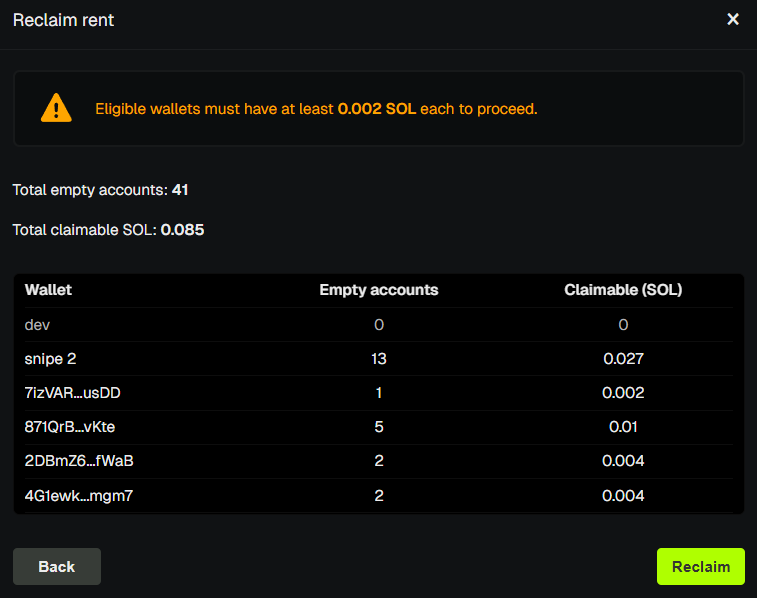
Minimum Balance
PumpKit leaves a little SOL in each wallet for fees. The rest is reclaimed. Wallets with nothing to reclaim are skipped.
PumpKit fee
On Standard accounts, PumpKit takes 10% of the rent you reclaim (see Pricing). With an active subscription, there is no PumpKit reclaim fee while the plan is on. Details: Subscriptions.
💡 Notes & Tips
- Reclaim after you sell out — that’s when accounts close.
- Reclaimed SOL stays in each wallet. Use Claim SOL to gather it into one address.
- After Holders Boost, use Booster holders so leftover SOL isn’t stuck.
- Small amounts add up across many wallets.