Ez Mode
Automated trading with stop guards. Auto Ez runs buys and sells on an interval, with optional market cap, PnL, and hold % triggers.
Access
Open the Hotkey tab (⌨️) in the Trade Panel. EZ Mode is below the hotkey buttons (available when a token is monitored).
Overview
Ez Mode can automate your trading strategy. It executes buys and sells at configurable intervals and can stop automatically when certain conditions are met (stop guards).
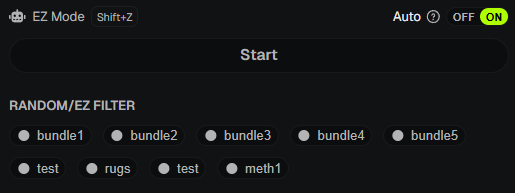
Run Modes
Manual (OFF)
- One-shot trade per click. Use Trade for a single EZ trade.
Auto (ON)
- When Auto is ON, click Start. Auto Ez runs until you click Stop or a stop guard fires.
- Useful for hands-free sniping.
Accessing Settings
Interval, stop guards, and stop actions are configured in a separate modal that can be easy to miss:
- Turn Auto to ON (the toggle next to EZ Mode).
- Click the Auto label or the ? icon next to it to open Auto EZ Mode Settings.
- In the modal:
- Interval Settings - at the top (Manual/Random, delay in seconds).
- Stop-Guards - scroll down; turn each guard ON, then click its row to expand and set thresholds.
- Stop-Actions - below Stop-Guards; expand Sell on stop trigger to set the sell % when a guard fires.
You must have Auto ON before the settings link is clickable. Configure guards before clicking Start.
Interval Settings
- Manual - Fixed delay between trades (e.g., 5 seconds).
- Random - Min and max delay; PumpKit picks a random value in between.
- Typical range: 3–8 seconds for staggered execution.
Stop Guards
When a stop guard triggers, Auto Ez stops (and optionally executes a stop action).
| Guard | Description |
|---|---|
| Market Cap | Stop when MC goes above or below a USD threshold |
| PnL | Stop when realized PnL hits take-profit or stop-loss (SOL) |
| My Hold % | Stop when your combined wallet hold % goes above or below |
| Outsider Hold % | Stop when outsider hold % goes above or below |
| Outsider Buy | Stop when an outsider buys at least X SOL |
Stop Actions
When a guard triggers, you can optionally sell a percentage of your position:
- Sell on Stop - Enable to auto-sell (e.g., 100%) when any guard fires.
- Useful for stop-loss scenarios.
💡 Notes & Tips
- Start with conservative guards - e.g., low PnL stop-loss or narrow market cap range.
- Interval mode helps avoid obvious on-chain patterns.
- Auto Ez respects your Trade Settings (slippage, fees).
- If Vault locks, Auto Ez stops automatically.