Hotkey Trading
Execute trades instantly with keyboard shortcuts. Hotkey trading supports manual and random modes for fast, hands-free execution.
Access
Click the ⌨️ keyboard icon in the Trade Panel to open the Hotkey Panel.
Overview
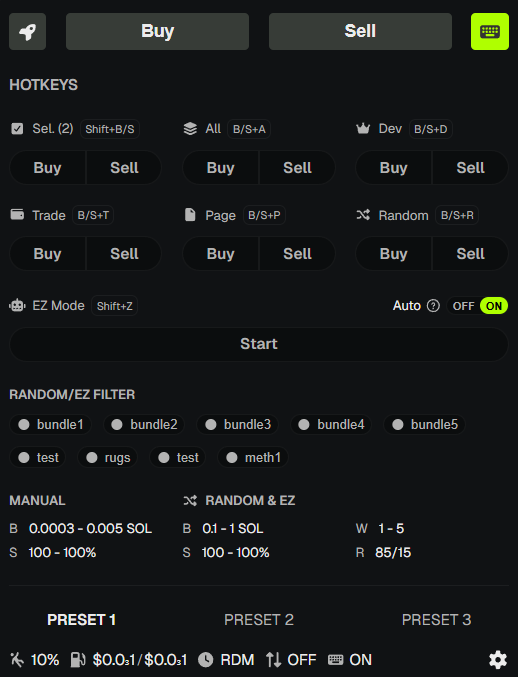
Hotkey Trading lets you execute buys and sells without clicking. Configure your settings once, then use keyboard shortcuts to trigger trades across selected wallets.
Modes
Manual Mode
- Set min/max SOL for buys and min/max % for sells.
- Each hotkey press executes a trade with a random amount within your range.
- Choose which wallet presets participate (up to 10).
Random Mode
- PumpKit randomly selects wallets and amounts from your configured ranges.
- Set min/max wallets per trade.
- Set buy ratio (e.g., 0.5 = 50% chance of buy, 50% sell).
- Auto interval - trades execute automatically at a set interval (e.g., every 5 seconds).
Wallet Preset Shortcuts
- C + 1 through C + 9 - Load presets 1–9. C + 0 - Load preset 10.
- Hold the C key (letter C, not Ctrl/Cmd) and press a number to activate that preset.
- Presets must be created in Wallet Presets first.
Quick Selection Shortcuts
When the Hotkey Panel is closed, these shortcuts still work for wallet selection:
- Shift + A - Select All wallets
- Shift + D - Select Dev wallet only
- Shift + T - Select Trade wallets only
- Shift + P - Select wallets on current page
- Shift + Y - Select wallets with tokens
- Shift + N - Select wallets with no tokens
- Shift + E - Select empty wallets
- Shift + C - Clear selection
Requirements
- Token must be monitored - Use Token Search first.
- Wallets selected - Use presets or quick selection.
- Hotkeys enabled - Toggle ON in the Hotkey Panel.
warning
Hotkey trades execute immediately with no confirmation. Ensure your amounts and slippage are set correctly in Trade Settings.
💡 Notes & Tips
- Start with Manual Mode and small amounts to test.
- Use Random Mode for staggered, less predictable execution.
- Wallet presets make it easy to switch between different wallet groups.
- In Focus mode, hotkey trades and Auto EZ only use wallets in the active preset.
- Keep slippage adequate - hotkey trades use your current Trade Settings.