Take Profit / Stop Loss
Per-wallet take profit tiers, stop loss, and trailing stop. Automate exits based on price targets or trailing percentage.
Access
Click the ✏️ pen icon on a wallet card in the Wallets Panel or Positions view.
Overview
TP/SL (Take Profit / Stop Loss) lets you set automatic sell triggers per wallet. When price moves in your favor (take profit) or against you (stop loss), PumpKit can sell a configured percentage automatically.
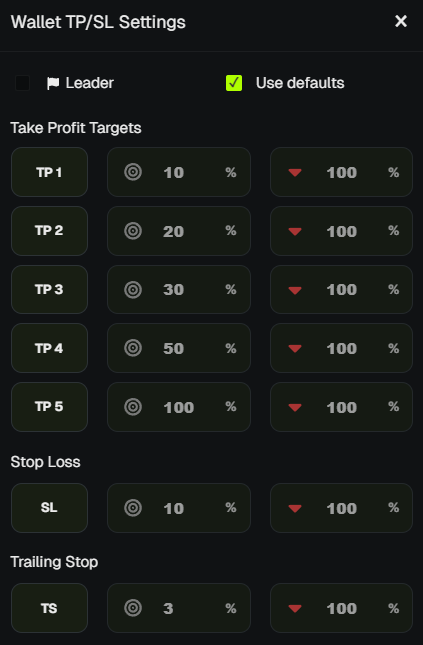
Take Profit Tiers
Up to 5 tiers per wallet:
- Trigger % - Price must rise by this % from entry to fire.
- Sell % - Percentage of position to sell when triggered.
Example: Tier 1 = 10% trigger, 20% sell → When price is up 10%, sell 20% of holdings.
Stop Loss
- Trigger % - Price must fall by this % from entry to fire.
- Sell % - Usually 100% to exit fully.
Example: 10% trigger, 100% sell → If price drops 10%, sell entire position.
Trailing Stop
- Trigger % - How far price must pull back from peak to fire.
- Sell % - Percentage to sell when triggered.
Example: 5% trigger, 100% sell → If price falls 5% from its high, sell 100%.
Trigger Modes
- Self - Triggers based on this wallet's entry price.
- Mirror - Triggers based on a leader wallet's entry price. Useful when one wallet leads and others follow.
Global Defaults
- Set default TP/SL values in Trade Settings.
- Each wallet can use global defaults or override with custom values.
💡 Notes & Tips
- Start conservative - Use wider triggers (e.g., 15–20%) in volatile markets.
- Trailing stop locks in gains as price rises, then exits on pullback.
- Mirror mode keeps sniper wallets in sync with a dev wallet's entry.
- TP/SL runs in the background - no need to keep the dashboard open (subject to session limits).