Trade Settings
Customize how your trades execute with presets, slippage, intervals, fees, auto-sell, TP/SL defaults, and hotkey trading.
Access
Click ⚙️Gear icon in Trade Panel to open Trade Settings. Use Shift + 1, Shift + 2, or Shift + 3 to switch presets without opening the modal.

Presets
- 3 presets save full sets of trade settings (slippage, fees, intervals, auto-sell, TP/SL, hotkeys).
- Switch presets at the top of the modal or via Shift + 1, Shift + 2, Shift + 3.
- Name each preset in the Trade Panel display for quick identification (e.g., "Launch", "Snipe", "Conservative").
Slippage
- Options: 10%, 20%, 50%, 99%, or enter a custom %.
- Higher slippage = greater chance of success in volatile markets, but worse potential fills.
- Limits: minimum 1%, maximum 99%.

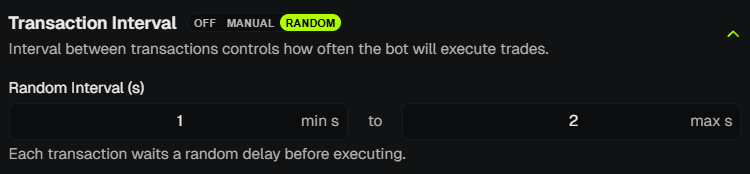
Transaction Interval
Control how trades are executed across multiple wallets.
- Disabled - no delay; all trades fire instantly.
- Manual - set a fixed delay between transactions (e.g., 0.1s, 1s, 2s, 5s, 10s or custom).
- Random - set a min and max delay; PumpKit picks a random delay within that range.
- Both Manual and Random: 0.1s → 10s.
warning
Applies only to non-bundle trades (bundles ignore intervals).
info
To see how intervals behave in execution, check Trade Panel
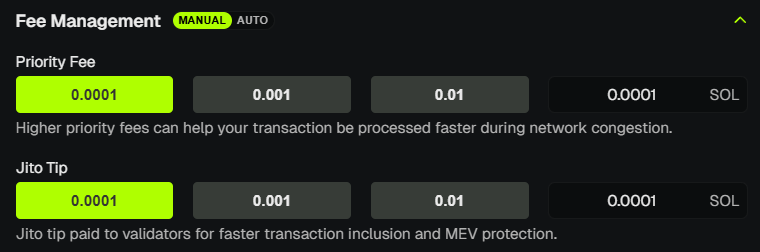
Fee Management
- Manual - you set priority fee and Jito tip yourself.
- Auto - PumpKit uses real-time network data to optimize fees.
- Max Auto Tip - set a cap (e.g., 0.01, 0.02, 0.03, 0.05 SOL) for the maximum tip you’re willing to pay per transaction. Custom values allowed.
Auto-Sell
- Guard against front-running - when a sniper buys more than a threshold % of supply after token creation, PumpKit auto-sells a configured percentage.
- Sniper Supply Threshold - e.g., 1%, 3%, 5%, 10% or custom. Triggers when outsider buys exceed this.
- Sell Percentage - 25%, 50%, 75%, 100% or custom. How much of your holdings to sell when triggered.
- Useful for launches where you want to protect against early snipers.
TP/SL Defaults
- Set global defaults for Take Profit / Stop Loss per wallet.
- 5 TP tiers - trigger % + sell % for each tier.
- Stop Loss - trigger % and sell %.
- Trailing Stop - trigger % and sell %.
- Each wallet can use these defaults or override with custom values. Enable TP/SL per wallet in the Wallet Manager or Positions view.
Hotkey Trading
- Manual mode - set min/max buy amount (SOL) and min/max sell % for hotkey trades.
- Random / EZ mode - random buy/sell amounts, wallet count (1–99), and EZ Mode Ratio (buy vs sell probability, e.g., 50% = 50/50).
- Auto interval - 1–10s delay between hotkey trades when enabled.
- See Hotkey Trading for full shortcuts and behavior.
Recommended Defaults
If you’re just getting started, we suggest:
- Slippage: 20-30% (safe for most launches, avoids unnecessary failures).
- Transaction Interval: Disabled (instant execution).
- Fee Management: Auto ON, Max Auto Tip 0.003–0.01 SOL (fast + cost-efficient).
These settings balance speed, reliability, and safety while still giving you flexibility later as you fine-tune.
💡 Notes & Tips
- Use higher slippage for launches or volatile pairs to reduce failures.
- Intervals help stagger wallet activity, making trades look more natural on-chain.
- Auto Fee Management is best for high-speed trading; Manual is for full control.
- Presets let you switch between launch, snipe, and conservative strategies instantly.