User Settings
The User Settings Panel lets you manage payout addresses and secure your PumpKit account with rebind and recovery options.
Access
User Menu → Settings
Funding
Refund & Payout Address
- Enter your Solana wallet address here.
- This address is used for:
- Referral payouts (from the Earnings Panel).
- Dispersion refunds (if funds remain in a relay wallet when you cancel).
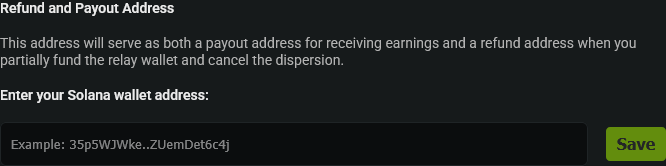
Always double-check this address before saving.
Rebind to a New Telegram
Use this option if you want to connect PumpKit to a different Telegram account.
How It Works:
- Generate a Rebind Code in User Settings (expires in 5 minutes).
- Open your new Telegram account.
- Start a chat with @pumpkitapp_bot.
- Send:
/rebind <your-code>. - Wait for confirmation, then log in with the new Telegram.
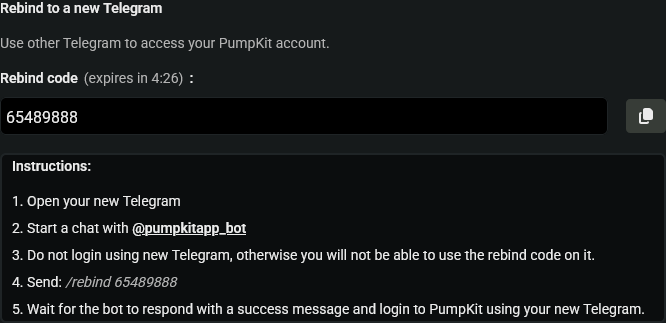
If you log into PumpKit with the new Telegram before rebinding, the code will not work.
Emergency Recovery
Generate a Recovery Code in case you lose access to your current Telegram.
Recovery Codes are:
- Single-use (invalidate after use).
- Shown only once - copy and save securely!
How to Recover:
- Generate a Recovery Code in User Settings.
- Go to Telegram and chat with @pumpkitapp_bot.
- Send:
/recover <your-code>. - Wait for confirmation, then log in with your new Telegram.

If you regenerate a new Recovery Code, your old one is invalidated immediately.
Include Fees in PnL
- Checked - PnL includes fees, rent, and tips (full wallet delta). More accurate for net profit.
- Unchecked - PnL shows swap-only amounts (excludes fees). Cleaner for comparing trade performance.
This setting affects the Price Monitor, Trade History, Positions, and wallet cards.
Vault
The Vault protects sensitive operations (export, claim, disperse, etc.). When locked, you'll be prompted to unlock before proceeding.
- Timeout - Set how long the Vault stays unlocked (e.g., 30 minutes). It locks automatically after that.
- Password - Store it securely. PumpKit cannot recover it if lost.
💡 Notes & Tips
- Always save your Recovery Code in a secure location - if lost, PumpKit cannot restore it.
- Your payout/refund wallet and security settings can be updated anytime in this panel.
- Adjust Vault timeout based on your usage.
- Use Rebind when you still have access to your old Telegram.
- Use Recovery only if you’ve completely lost access to your old Telegram.