Create Token Metadata
Define your token’s identity - this is what traders will see when they encounter your project.
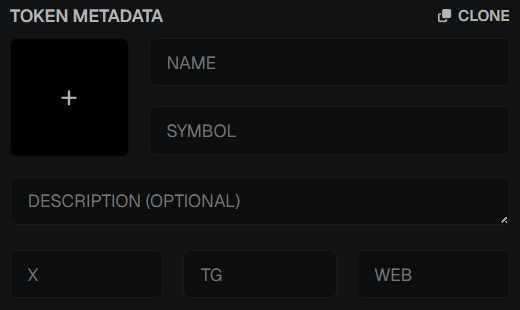
Fields
- Token Image - upload a logo or meme image, or generate one.
- Name & Symbol - short, memorable identifiers for your token.
- Description (optional) - a tagline, meme slogan, or short pitch.
- Social Links - Twitter (X), Telegram, and Website.
Mint Address Reservation
Before launching, you need a reserved mint address for your token.
- Click GET next to the Mint Address field to reserve an address.
- The address is reserved for a limited time - a countdown shows when it expires.
- Copy the address by clicking it - share it with snipers or use it in your launch setup.
- If the reservation expires before you launch, click GET again to reserve a new one.
- The reservation is tied to your selected launchpad (Pump.fun or Bonk.fun).
info
You must have a reserved mint address before the Launch Token step. Reserve early so you're ready when you deploy.
💡 Notes & Tips
- Immutable: Metadata cannot be changed after launch - review carefully.
- Keep names short, catchy, and meme-worthy.
- Keep your symbol up to 12 characters. On X.com, tokens get hyperlinked automatically when written as
$SYMBOL(e.g.,$PEPE,$BONK). Shorter symbols tend to look cleaner. - Always link socials - tokens without community links look suspicious and may scare off buyers.
- A strong token image and symbol make your coin more recognizable across DEXs and tracking tools.