Select Wallets
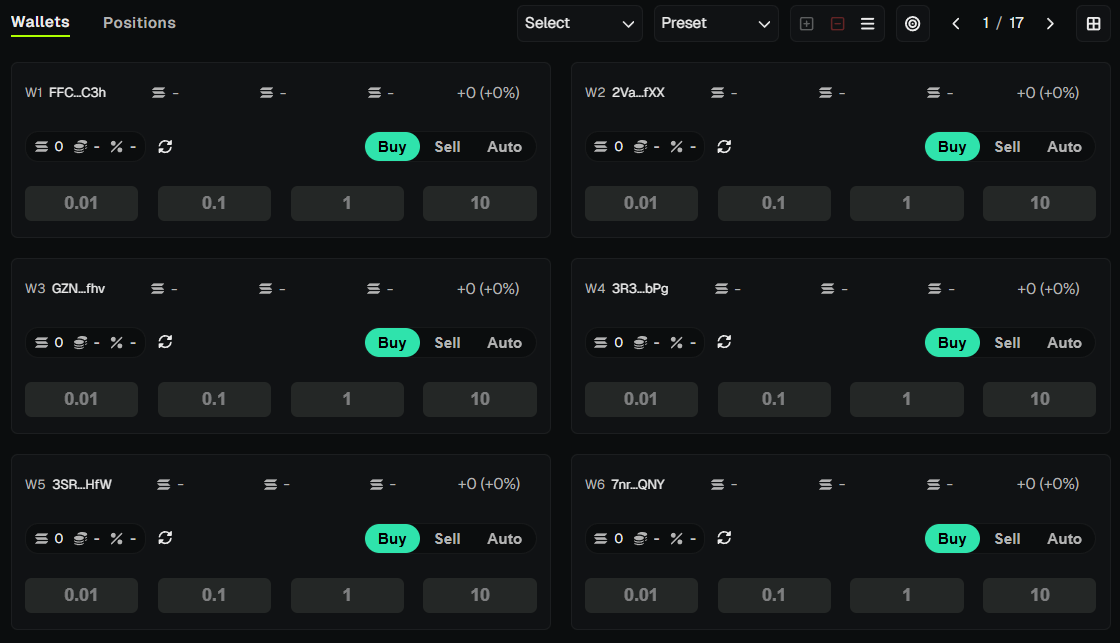
Select which wallets will participate in your launch using the Wallets Panel on the right side of the screen.
Getting Started
The Dev Wallet is auto-selected when you open the Create Tab. To add sniper or trade wallets, use the Wallets Panel (right side) - click wallet cards or use quick-selection filters.
Dev Wallet
If you unselect the Dev Wallet in the Wallets Panel, you must re-select it before launching.
If no Dev Wallet exists, an exclamation mark appears next to the Dev Wallet label in the Create Tab - create or restore a Dev Wallet before proceeding.
Sniper Wallets
If Sniper Mode (SNIPE ON) is enabled, additional sniper wallets may join the launch:
- Pump.fun: up to 12 sniper wallets.
- Bonk.fun: up to 8 sniper wallets.
Select sniper wallets in the Wallets Panel - they will be included in the same transaction when SNIPE is on.
💡 Notes & Tips
- Fund every participating wallet - launches will fail if a selected wallet lacks sufficient SOL.
- Use multiple sniper wallets with varied amounts to create a more natural distribution.
- Remember: when SNIPE is on, all selected wallets are charged within the same transaction - verify balances for Dev + all sniper wallets.
- Need to change wallets? Update selections in the Wallets Panel before finalizing the Create Tab settings.